Google Play Chargebacks Explained: What Every Developer Should Know
A customer buys your premium tier. Weeks later, the money is just gone from your payout. No email. No support ticket. Just a smaller balance and a line item you did not plan for. That is a Google Play chargeback, and starting August 3, 2026, the cost of losing one lands on you.
For years, Google absorbed most of these losses. That is over. A lost chargeback now pulls money straight out of your revenue. If you build for Android and sell anything through Play Billing, this is money you can lose while you sleep. The upside is that you also got a new way to fight back, and most teams have not wired it up yet. Our Google Play chargeback guide covers the setup, but this piece explains the mechanics first.
This is not a consumer explainer. This is what the Google Play chargeback process actually does to your books and your backend, and what you can do about it.
Key Takeaways
• A Google Play chargeback is a forced payment reversal started by the customer's bank, not by Google and not by your support team.
• Since August 3, 2026, a lost chargeback costs you the purchase price minus Google's service fee, plus the bank's chargeback fee.
• Google sends a PendingRefundReviewNotification over Real-time Developer Notifications when a dispute needs your input.
• You get 24 hours from that notification to respond through the ReviewRefund API.
• Only your first API response counts. Later calls are ignored, even though the API still returns OK.
• Bank chargeback fees are flat, so on cheap products the fee alone can cost more than the sale.
• Setting an obfuscated account ID at purchase is what lets you match a dispute back to a real user.
• Staying silent means you absorb the full loss with no argument on record.
What Is a Google Play Chargeback?
A Google Play chargeback is when a customer's bank reverses a payment they already made for your app or in-app purchase.
The customer does not ask you. They do not ask Google. They call their bank or card issuer and dispute the charge. The bank pulls the money back and opens an investigation. This is different from a normal refund because it starts outside the store, inside the banking system, where you have no direct account.
Example. Someone buys a $40 annual subscription. Two weeks in, they tell their bank they never authorized it. The bank claws the $40 back and flags the charge as disputed. You may have already served a month of premium features. The chargeback does not care what you delivered.
On Play, Google is the merchant of record, so the direct hit to you is financial rather than a processor reputation problem. That still means real money leaving your account.
Why Chargebacks Are Different From Refunds
A refund is a request handled inside Google Play. A Google Play chargeback dispute is handled by a bank.
A refund follows Google's rules and your settings. A chargeback follows card network rules and bank timelines. You have far less control, and the math is worse, because the bank adds its own flat fee on top of the reversed sale. A standard refund can also slip past your server without a word, and a chargeback is even quieter until the money is already gone.
Google Play Refund | Google Play Chargeback |
Started inside Google Play by the user or your rules | Started at the bank by the customer |
Follows Google Play policy and your settings | Follows card network and bank rules |
Returns the sale amount to the buyer | Returns the sale amount plus a flat bank fee |
You can often prevent or shape it | You can only contest it with evidence |
No extra bank fee | Bank chargeback fee added to your loss |
Example. A refund on a $10 purchase returns $10 to the buyer. A chargeback on that same $10 purchase can return the $10 and add a flat bank fee. On a small sale, one dispute can leave you further behind than the sale ever earned.
How the Google Play Chargeback Process Works
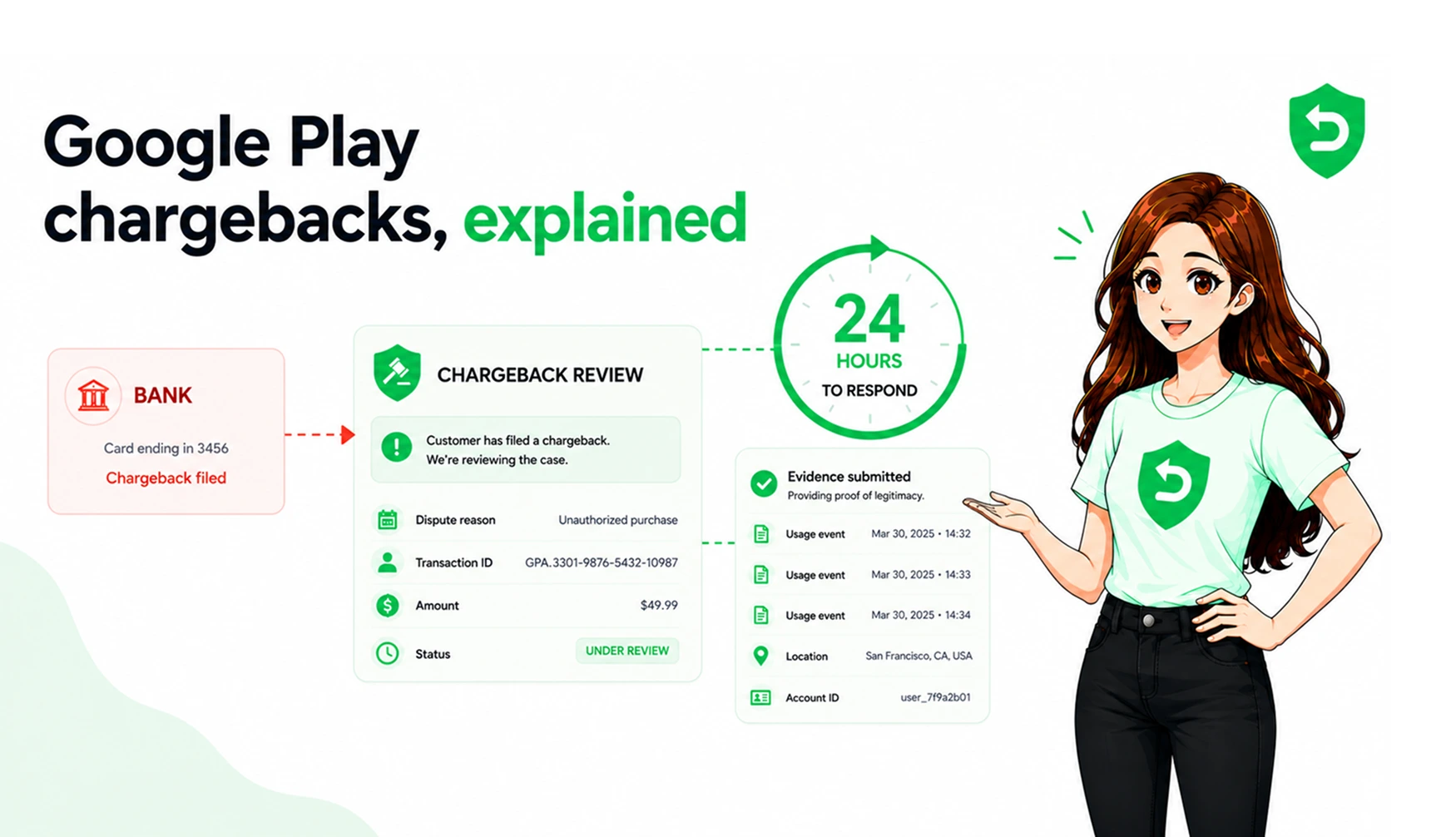
The Google Play chargeback process starts when a bank disputes a charge, then Google reviews it and, for cases that need your input, asks you for evidence inside a fixed window.
Here is the flow, step by step:
1. The customer disputes the charge with their bank.
2. The bank sends the dispute to Google, the merchant of record.
3. Google reviews the signals it already holds on the purchase.
4. For disputes that need developer review, Google sends a PendingRefundReviewNotification through Real-time Developer Notifications.
5. You have 24 hours to respond through the ReviewRefund API with your preference and any usage evidence.
6. Google argues the case with the bank using what you sent.
Example. A notification lands on your Pub/Sub topic at 2 a.m. Nobody is watching the queue. By 2 a.m. the next day the window has closed. If your system never answered, Google argues the case with only the customer's side of the story on record. You can read how Google frames this in its official chargeback documentation.
What Happens After a Chargeback Notification?
After the notification arrives, a 24-hour clock starts, and only your first response through the ReviewRefund API is recorded.
Your response can carry these fields:
• pendingRefundToken: the token from the notification. Required, and you echo it back so Google can match your reply to the dispute.
• sampleContentProvided: a true or false flag for whether you offered a free sample, trial, or clear functionality info before the purchase.
• refundPreference: your preference: APPROVE, DECLINE, or NEUTRAL, based on your own logic.
• consumptionPercentageMilliunits: how much the customer used, in milliunits, where 45200 means 45.2 percent.
• consumptionUsageEvents: up to 1,000 events, each with a timestamp, an IP address, a coarse location, and a description up to 5,000 characters.
One rule that trips teams up. Only your first call is stored. Later calls return OK but change nothing. So a partial first answer becomes permanent.
Example. Your server fires a quick response missing the usage events, planning to send them in a second call. That second call is silently discarded. The thin answer is now the only answer Google has. The full field list lives in the ReviewRefund API reference.
How Developers Should Respond
Respond automatically, inside the window, with a clear preference and real usage evidence tied to the disputed order.
A strong response usually does four things:
• Matches the dispute to a real user through the obfuscated account ID set at purchase.
• Sets a preference from your own logic, such as fraud pattern or consumption level.
• Attaches usage events with timestamps, IP addresses, and coarse location.
• Notes whether a sample, trial, or functionality preview was available before purchase.
Example. A user with 60 logged sessions, an IP that matches their signup country, and a clear consumption percentage is hard for a bank to call unauthorized. That evidence is exactly what Google forwards on your behalf. An account with none of that gives Google nothing to argue with.
Common Mistakes Developers Make
The biggest mistakes are not listening for the notification, missing the 24-hour window, and having no way to link a dispute to a user.
The pattern repeats across teams:
• Not subscribing to Real-time Developer Notifications for every notification type.
• Treating the window as business hours instead of a hard 24-hour clock.
• Never setting an obfuscated account ID, so disputes cannot be matched to a user.
• Sending an incomplete first response and assuming a follow-up will fix it.
• Skipping the API because it is technically optional, while still eating every loss.
Example. A team assumes a human can handle disputes during work hours. A notification arrives Friday night. By Monday the window has closed on three separate cases, and each one is now a silent loss.
Developer Action | Google Action |
Set obfuscated account ID at purchase | Uses it to tie the dispute to the right order |
Subscribe to RTDN for all types | Sends PendingRefundReviewNotification for review cases |
Respond within 24 hours via ReviewRefund | Records only the first response received |
Attach usage evidence and preference | Argues the case with the bank on your behalf |
Do nothing | Decides with only the customer's side, loss billed to you |
Revenue Impact of Chargebacks
Each lost Google Play developer chargeback costs you the sale price minus Google's service fee, plus a flat bank fee, so small purchases can turn negative.
Two quick cases show the range. A $40 subscription that loses a dispute costs you your net revenue on that sale plus the bank fee. A $2 coin pack is worse: a flat bank fee can dwarf the sale, so one dispute wipes out the margin from many clean purchases.
The loss also compounds. You already spent compute, storage, and sometimes support serving that purchase. Getting the revenue clawed back does not refund those costs. And repeat disputers bill you more than once, which is why matching disputes to a user identity matters so much.
Best Practices for Chargeback Prevention
You cannot stop a customer from calling their bank, so chargeback prevention means two things: reduce the disputes you can, and always contest the ones you get.
A practical checklist:
• Set an obfuscated account ID on every single purchase.
• Subscribe to Real-time Developer Notifications for every notification type.
• Log usage with timestamps, IP addresses, and coarse location from day one.
• Make billing terms and trial details clear before purchase, which cuts down on I did not authorize claims.
• Automate the ReviewRefund response so nothing depends on someone being awake.
There is one more step teams forget. Winning or losing the dispute, reclaiming access after a reversal is your job, not Google's. The money moving and the access ending are separate events.
Example. An app that logs sessions and sets account IDs from the start can answer any dispute in seconds. An app that logged nothing has nothing to send, and the window closes the same either way.
Closing the Gap
The gap most teams carry is the space between the moment Google asks for evidence and the moment a person notices.
The rules are public. The window is fixed at 24 hours. The only real variable is whether your system answers in time with real data. Manual handling loses that race almost every time, because disputes do not wait for office hours.
Chargebacks used to be Google's problem. Now they are yours, but so is the evidence and the API to use it. The teams that wire this up keep the revenue that the silent ones quietly hand back.
Where These Policies Are Documented
These are the primary sources behind everything above. No third-party blogs, only official Google documentation.
• Google Play Billing: Help Google dispute chargebacks
• Google Play Developer API: orders.reviewrefund reference
• Google Play Console Help: refund and chargeback cost responsibility
References
Frequently asked questions
A chargeback is a payment reversal started by the customer's bank, not Google.
A refund is handled by Google Play; a chargeback is handled by the customer's bank
You have 24 hours after receiving the notification.
Google proceeds without your input, and you may still be charged if the dispute is lost.
Yes. Respond through the ReviewRefund API with your decision and supporting evidence.
The sale amount (minus Google's service fee) plus the bank's chargeback fee.
Yes. Subscription payments can also be disputed through chargebacks.
You can't prevent all chargebacks, but good logging, clear billing, and fast responses can reduce them.